 Kinship Guard
The family caregiver app for sharing care of an aging parent
Kinship Guard gives your whole care circle one calm place to see what needs attention today, who owns it, and what happened since you last looked. No more group-chat scrolling or “did anyone call the pharmacy?”
Free to download · iPhone, iPad and Android
Free help you can use today
Print these, or fill in the sheet in your browser. No sign-up, no email address and no app needed.
Emergency information sheet builder
Fill in one page of essentials, then print it or save it as a PDF. It runs in your browser and keeps nothing.
Caring for aging parents checklist (PDF)
What to do in the first week, the first month and from then on, with a place for a named owner on every line.
Caregiver task list (PDF)
Daily, weekly, monthly and as-needed care tasks, with a column for one owner and one backup.
Medication list (PDF)
A blank list of every medicine, vitamin and supplement, to share with the family and take to each appointment.
Doctor's appointment checklist (PDF)
What to bring, questions worth asking, and a space for what was said and what happens next.
Questions to ask aging parents (PDF)
Conversation prompts about wishes, health, paperwork, money and home, with room to write the answers in their words.
Everything a care circle needs to stay on the same page
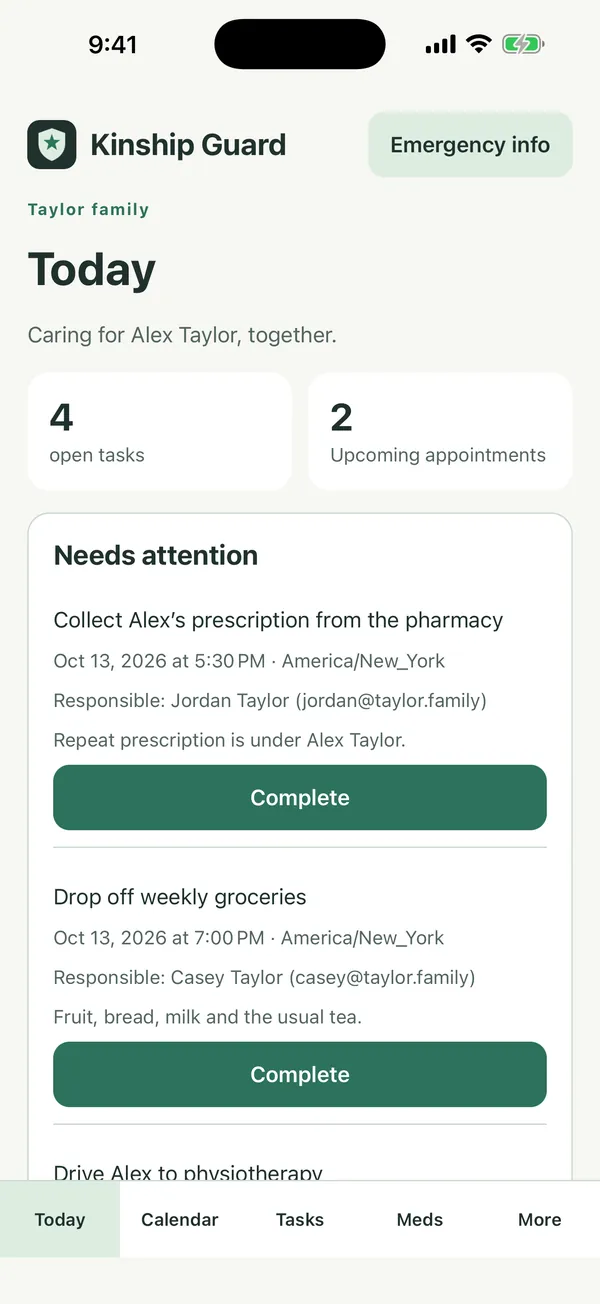
Today at a glance
See what is due, what is done and what is coming, so nobody has to ask the family what still needs doing.
Tasks with an owner
Hand a task to a named family member and see when it is completed. Care stops depending on whoever shouts loudest.
Appointments that mean what they say
Each appointment is stored with a time zone and a responsible person, so a sibling in another state reads the same moment you entered.
Daily medication schedules
Set daily doses and confirm each one. A confirmation records who gave it and when, and cannot silently overwrite someone else's.
A shared care journal
Write short updates once and everyone reads them. A handover never depends on one person's memory.
Documents and emergency information
Keep care paperwork and emergency details where the family can find them when it matters.
How it works
- Create a care circleAdd the person you care for and give the circle a name.
- Invite your familyInvitations are sent in the app. Choose what each person can do: administrator, member or limited.
- Share the loadAdd tasks, appointments, doses and notes. Everyone sees the same up-to-date picture.
See it in action
Screens use a fictional family.


Built for how families really share care
Caring for an aging parent is rarely one person's job, and it is almost never one person's information. Kinship Guard is for the daughter who lives nearby, the brother two time zones away, the spouse who keeps the pills straight, and the carer who needs a handover that does not depend on a phone call.
Read our practical guides: start with the caring for aging parents checklist, then what a family caregiver app does, the signs a parent needs more help, sharing caregiving with siblings, keeping track of a parent's medications, long-distance caregiving and all of our caregiver guides.
Questions families ask
What is Kinship Guard?
Kinship Guard is a shared care app for families. A private care circle sees what needs attention today, who owns each task, upcoming appointments, daily medication doses, shared journal updates, documents and emergency information, all in one place on iPhone, iPad and Android.
Who is it for?
Families sharing the care of an aging parent or another relative: adult children, siblings, spouses and other family carers (called caregivers in the US and carers in Australia and the UK), including those who live in different cities or time zones.
Is Kinship Guard free?
It is free to download. Plans, prices and any eligible free trial are shown by the App Store or Google Play before you confirm a purchase. One subscription covers a whole care circle, and the people you invite join at no extra cost.
How does a care circle work?
One person creates the circle for the person being cared for and invites family members from inside the app. The circle administrator chooses what each person can do: members can add and complete things, and limited members can view and confirm.
Can it help us keep track of medication?
You can set daily medication schedules and confirm each dose as it is taken. Each confirmation records who confirmed it and when, so two people do not give the same dose or assume the other did. Reminders are optional and never include names or medication details. Kinship Guard does not give medical advice and does not replace your pharmacist or doctor.
Does it work without a connection?
Completing a task and confirming a dose can be saved on your device and synced when you reconnect, and you can see which changes are waiting. Other parts of the app need a connection.
Who can see our information?
Only people you invite to the care circle, and only what their access allows. We do not sell personal information and medication details are never used for advertising. Read the full privacy policy for how the app and its service providers process data.
Is it a medical device?
No. Kinship Guard is an organization and communication tool. It does not provide medical advice, diagnosis or emergency services. In an emergency, contact your local emergency services.
Which devices does it run on?
iPhone and iPad (App Store) and Android phones and tablets (Google Play).
How do I delete my account?
You can delete your account inside the app. The delete-your-account page explains what is removed and what stays visible to the rest of the circle.
Give your family one shared place for care
Free to download.